

Sudoo.sh overview
%20infinite}@media%20(prefers-reduced-motion:reduce){.cursor{animation:none}}%3c/style%3e%3crect%20width='64'%20height='64'%20rx='14'%20fill='%23FFFFFF'/%3e%3ccircle%20cx='27.4'%20cy='35.6'%20r='10.6'%20fill='none'%20stroke='%23714B67'%20stroke-width='5.3'/%3e%3ccircle%20cx='38.8'%20cy='21.3'%20r='2.65'%20fill='%23714B67'/%3e%3crect%20class='cursor'%20x='45.1'%20y='18.8'%20width='3.3'%20height='29.7'%20rx='0.4'%20fill='%23714B67'/%3e%3c/svg%3e)
Every Odoo environment your team needs (demos, test branches, training, customer previews) on one server you own, for the price of that server instead of a bill per environment.
Any branch of your repository becomes a running Odoo, any version, Community or Enterprise, with its own HTTPS link, in about two minutes. Instances nobody is using pause themselves, so one ordinary server holds dozens of them.
sudo + Odoo: full control of your Odoo instances, on a server you own.
Community and Enterprise · Any Odoo version · GitHub sync · Live metrics · Five roles · Second factors · Auto-pause · Daily backups and one-click restore · One-command install
IMPORTANT
Instances are for showing Odoo, not for real data. Every instance opens with the Odoo login admin / admin, and anyone who has an instance's link can sign in with it. With the default exposure plugin the public links are free Cloudflare links: they change when the server restarts, and the panel always shows the current ones. Panel accounts are different: their passwords are stored only as hashes, and a second factor can be required.
Quick start
On a Linux server (Ubuntu 22.04+ or Debian 12+), one command checks the server, installs what is missing (Docker, after asking) and starts Sudoo.sh from its prebuilt images:
curl -fsSL https://github.com/Sudoo-sh/sudoo.sh/releases/latest/download/sudoo-install.sh | sudo bashTo read the installer before running it, download it with the release's checksums, check it, and run it:
curl -fsSLO https://github.com/Sudoo-sh/sudoo.sh/releases/latest/download/sudoo-install.sh
curl -fsSLO https://github.com/Sudoo-sh/sudoo.sh/releases/latest/download/SHA256SUMS
sha256sum --check --ignore-missing SHA256SUMS      # must print: sudoo-install.sh: OK
less sudoo-install.sh                              # read it
sudo bash sudoo-install.sh
It prints the panel's link and a setup code. Open the link, enter the code, and create your own account with your name, e-mail and password; you sign in with your e-mail address. Everything else, including the e-mail account that sends sign-in codes, is set up in the website. Without the installer: Manual installation. Details in Installation & Configuration.
Why Sudoo.sh
The problem: every extra environment costs money
Odoo teams rarely need just one test database. A partner wants a fresh demo for each prospect, developers want every feature branch running before it reaches production, consultants want a copy to try a configuration on, trainers want one per class, and customers want a link to check a fix themselves.
On hosted platforms such as Odoo.sh, each staging environment is billed every month on top of workers and storage, development builds are short-lived and not meant for customers, and the hosting price does not include the Enterprise licence. The more branches a team keeps, the higher the bill, so teams start rationing: demos are deleted too early, several features share one staging, and some work never gets a live environment at all.
The solution: pay for one server, run as many environments as it holds
| Hosted, billed per environment | Sudoo.sh | |
|---|---|---|
| One more demo or test branch | adds to the monthly bill | costs nothing extra; limited by your server's disk |
| Environments nobody is using | billed while idle | paused, using no memory, until someone opens the link |
| A demo for a prospect | wait for a build, share access to the project | its own link in about two minutes, deleted after the days you choose, with a backup |
| Testing a feature branch | a few staging slots shared by everyone | every branch its own instance, updated on every push |
| Where your code and data live | the provider's cloud | your server |
A typical team runs Sudoo.sh on a single rented server with a few gigabytes of memory: the instances in use run, the rest wait paused, and the monthly cost stays the server's price however many branches there are.
Made for: Odoo partners and integrators (a demo per prospect), in-house Odoo teams (every branch tested before production), trainers and schools (an instance per class or student), and freelancers.
Not for: production databases. Keep live company data on a production host; Sudoo.sh is for everything around it (development, demos, tests and training).
Sudoo.sh and Odoo.sh
Sudoo.sh is to your own server what Odoo.sh is to Odoo's cloud: branches become running instances. It is an independent project, not affiliated with Odoo S.A.
| Odoo.sh | Sudoo.sh | |
|---|---|---|
| Where it runs | Odoo's cloud | your server (one Docker host) |
| Cost | per worker, per GB of storage and per staging environment | your server; free for noncommercial use, a commercial licence for companies |
| A running Odoo per branch | yes | yes, Community or Enterprise, any version |
| Updates on push | yes | yes: GitHub App, GitHub webhook or polling (plugins) |
| Instances that pause and expire | staging builds expire | pause when unused, wake on the next visit; lifetime with a backup |
| How instances are reached | *.odoo.com | free Cloudflare tunnels, open ports, or your own exposure plugin |
| API for automation | signed REST API (Panel API) | |
| Production hosting | yes | no: Sudoo.sh is for development, demos, tests and training |
What This Panel Does
Sudoo.sh runs on the server and is used from a browser. Nobody has to install anything or run any command to use it: people receive a link.
- Create an instance in a few clicks: choose a GitHub repository, a branch, the Odoo version (any published version) and the edition (Community or Enterprise). The name, the database, the ports and the passwords are generated. Two minutes later the panel shows the instance's own https link and its login. See Creating an instance.
- One https link per instance: every instance is reachable from anywhere through its own link, even though the server accepts no incoming connections. Browsers, API clients and webhook senders use it like any Odoo address. See Tunneling.
- Stays in sync with GitHub: by polling GitHub every 2 minutes, or instantly through a GitHub webhook (both are plugins, use either or both); when a developer pushes, the instance pulls the code, upgrades only the modules whose files changed and restarts. Submodules (for example OCA repositories) can be updated, added and removed from the panel.
- Private repositories without personal tokens: connect GitHub once and the panel's own read-only GitHub App reads every repository you allow on your account or organisation, submodules included; pushes reach the panel at once. Servers without it use one read-only deploy key per repository, created by the panel and stored encrypted. See The GitHub App and Deploy keys.
- Saves memory by itself: an instance nobody opened for 6 hours is paused, and starts again by itself on the next visit (a "Starting up" page is shown for a few seconds).
- Restart, pause, switch off, delete: from the list (Restart) or from the instance's page.
- Lifetime and backups: each instance can be deleted automatically a set number of days after its creation (30 by default), or kept. The choice is made when creating it and can be changed later. Before any deletion, automatic or by hand, the database and files are saved as a standard Odoo backup, listed under Backups.
- Daily backups with one-click restore: every instance that was used during the day is backed up once a day, at a time you choose, keeping its latest daily backup. Restore the latest on the instance's page puts a backup back in a minute or two, after saving the current state, and Rollback undoes it for 24 hours. Any backup can also go into another instance of the same Odoo version, or start a new instance, neutralised so the copy sends no e-mail. See Backups.
- Five roles: super admin, administrator, maintainer, developer and viewer, each a clear set of permissions. People sign in with their e-mail address; passwords follow the NIST rules (length and a blocklist, no forced symbols). Sign-in can require a second factor: an authenticator app or a code by e-mail. See Accounts and roles.
- Live figures: processor, memory, requests, errors and response times of the server and every instance, every few seconds, with an hour of history. The Instances page charts requests and errors, instances by state, response times and the busiest instances. Pages update by themselves as things change.
- An API for other systems: CI pipelines and scripts can create, update, restart and delete instances with an API token and a signature on every request. See Panel API.
- Apps for Odoo: your company's own Odoo can create and manage instances from the record that needs them, with free apps on the Odoo Apps store for Odoo 17.0 to 20.0, in English and Arabic: Instance Manager, CRM Demos (a demo per opportunity), Project Tests (a test instance per task) and Helpdesk Tests (per ticket). They use a token of the least-privilege instances scope. Source and documentation: Sudoo-sh/sudoo-odoo.
- Explains itself: plain-language messages when something fails, the technical log next to it, and this documentation inside the panel under Help.
- Set up from the website: every setting, from second factors and limits to the e-mail account, on the Settings page, with
.envas the base. Light and dark themes, and your own accent colour.
Architectural Position
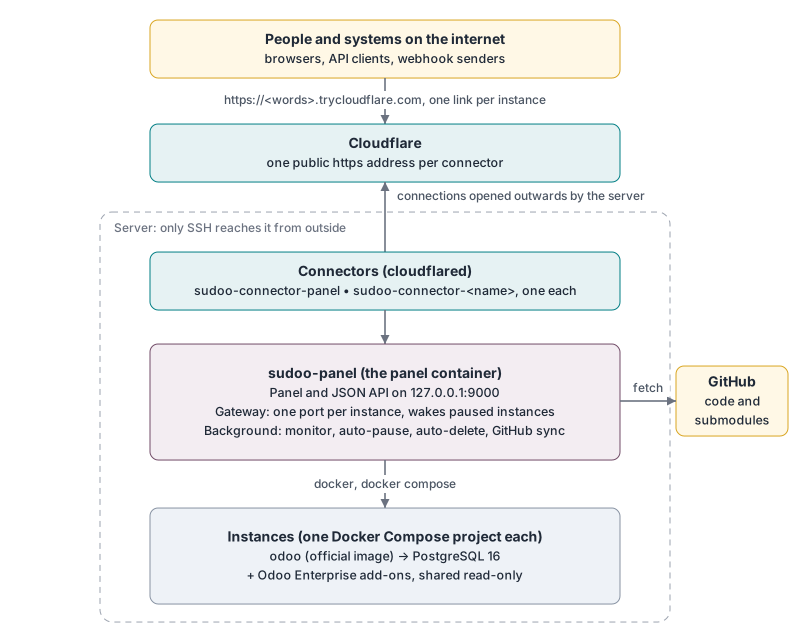
Everything on the server listens on 127.0.0.1 only. The only ways in are the Cloudflare connectors (which the server itself opened) and SSH for administrators. The full picture is in Architecture.
Technologies and What We Gain From Them
| Technology | What it does here | What we gain |
|---|---|---|
| Docker Engine | Runs every Odoo, every PostgreSQL, the panel and the connectors as containers. | Instances are isolated from each other and from the server: one can break or be deleted without touching the others. See Docker. |
| Docker Compose | Describes each instance (Odoo + PostgreSQL + volumes) as one project. | One command starts, stops or removes a whole instance, and deleting leaves nothing behind. |
Official Odoo images (odoo:<version>) | The Odoo program itself. | Nothing to build or maintain; every version behaves exactly as Odoo publishes it; new versions appear in the panel by themselves (ODOO_VERSIONS=auto). |
| PostgreSQL 16 | The database of each instance. | Odoo's own database; one per instance, so instances never share data. |
Cloudflare Tunnel (cloudflared, quick tunnels) | Gives the panel and every instance a public https address. | Works without any open port, free, https included, no domain needed. See Tunneling. |
| Python 3.12+ with type hints | The panel's language. | Same language as Odoo, so every Odoo developer can read and fix it; type hints checked by mypy catch mistakes before they run. |
| uv | Installs the dependencies, from a lock file. | Fast, and every installation (servers, CI, developers) gets exactly the same versions. |
| pydantic-settings | Reads and checks the settings. | Every setting typed and documented in one class; a wrong value stops the panel at start-up with a clear message. |
| Entry-point plugins | How instances are reached, where Enterprise comes from, what starts updates. | Nothing is forced: each server chooses, and new options are added as plugins without changing the panel. See Plugins. |
| Flask | The panel's pages and JSON API. | Small, well known, signed session cookies built in. |
| Gunicorn | Serves the Flask app. | Production web server; threads let long actions run without blocking the page. |
| aiohttp | The gateway in front of every instance. | Streams large files and keeps thousands of WebSocket connections (Odoo's live updates) open with little memory. See Gateway. |
| cryptography (AES-256-GCM) | Encrypts the secrets the panel must read back (deploy keys, Odoo master passwords). | Audited library; encryption that also detects any change to the stored value. See Passwords and encryption. |
| scrypt (Python standard library) | Hashes panel passwords. | Slow and memory-hungry on purpose, so stolen hashes are very expensive to guess. |
| Git and SSH deploy keys | Fetch code; read-only access to one repository per key. | No personal account or token whose owner might leave; each key can be revoked on its own. See Git submodules. |
| React 19 + TypeScript + Vite | The web app (web/), a separate service on top of the API. | Typed end to end; pages load only when opened; fast rebuilds; any front-end developer can work on it. |
| TanStack Query + Server-Sent Events | Data in the web app, kept current by the live event stream. | Pages update the moment something happens, with no polling; data is cached between pages. |
| SCSS design tokens | Every colour, size, material and motion defined once (web/src/styles/_tokens.scss), light and dark themes; the system font, translucent chrome and motion in Apple's manner (Design). | Restyling Sudoo.sh is one file; the accent colour follows BRAND_COLOR. |
| Chart.js | The live charts: an hour of figures, updated in place as each sample arrives. | Smooth, accessible canvas charts in a small, tree-shaken bundle. |
| Caddy | Serves the web app and forwards /api to the backend (container sudoo-web). | One small binary, compression, strict security headers, no configuration beyond one file. |
| SQLite | The panel's own data (accounts, tokens, audit log). | Transactions and queries without a database server. |
| Python-Markdown | Shows this documentation inside the panel. | One set of Markdown files, read on GitHub and in the panel. |
Alpine Linux (python:3.15-alpine) | The panel's container. | Small image; the Docker command line is copied in from the official Docker image. |
| black, ruff, mypy, pre-commit | Formatting, lint, type checks on every commit and in CI. | One style, mistakes caught before review, enforced for everyone. |
Why each of these was chosen over the alternatives is explained in Architecture: why we chose this.
Documentation
All documents are in docs/ and are also shown inside the panel under Help.
| Document | For | What it covers |
|---|---|---|
| Documentation index | everyone | Where to find what, by question ("how do I...?") |
| User manual | everyone who uses the panel | Every page and button of the panel, step by step |
| Administrator guide | the server's administrator | Installing, files, backups, Enterprise add-ons, troubleshooting |
| Configuration | the server's administrator | Every setting, with its type and default |
| Plugins | administrators, developers | Choosing how instances are reached, where Enterprise comes from and what starts updates; writing your own |
| Panel API | developers | Managing instances from other systems with signed API calls |
| API and webhooks | developers | Calling an instance's Odoo from other systems |
| Architecture | developers | How the parts work together, and why we chose each of them |
| Design | developers, designers | The design system: tokens, type, materials, motion, charts; restyling Sudoo.sh |
| Security | administrators, reviewers | Passwords, encryption, sessions, input checks, what is and is not protected |
| Concepts | anyone curious | Tunneling, Docker, the gateway, deploy keys, submodules, passwords and encryption, web attacks; each with examples |
Security at a Glance
| Topic | How it is handled |
|---|---|
| Reachability | Nothing listens on a public address. The web app, the backend, the gateway and Odoo listen on 127.0.0.1; the way in is the Cloudflare connectors. |
| First run | No default accounts: the first account is created with a one-time setup code printed on the server. |
| Panel passwords | Never stored. Only a salted, peppered scrypt hash is kept; the pepper comes from a key outside the accounts file. Rules follow NIST SP 800-63B: 12 to 128 characters, common passwords and sequences refused. Sign-in is locked after repeated failures. |
| Stored secrets | The GitHub App's private key, GitHub deploy keys and Odoo master passwords are encrypted with AES-256-GCM. Odoo itself only receives a hash of its master password. |
| Input | Every value from a browser or API client is checked against an allow-list (type, length, characters, pattern) before use, and never passed through a shell. |
| Sessions | Signed, HttpOnly, Secure, SameSite=Strict cookie; signed out after 60 minutes without activity and after 12 hours. |
| Browser | CSRF token and same-origin check on every change; strict Content-Security-Policy; no inline scripts; HSTS. |
| Second factors | Authenticator app or e-mail code; can be required for administrators or everyone. |
| Roles and audit | Five roles made of named permissions, checked on the server for every request; every sign-in, refusal and action is in the audit log. |
| Limits | Requests per minute per user or address; how many instances, and how often. |
Details, and what is deliberately not protected, are in Security.
Components
sudoo.sh/
├── README.md, LICENSE.md, CHANGELOG.md, CONTRIBUTING.md, SECURITY.md
├── pyproject.toml, uv.lock        # dependencies (locked with uv), plugins, tool settings
├── Dockerfile, compose.yaml       # the backend image (sudoo-panel, with docs/ inside) and the web app (sudoo-web)
├── .github/workflows/             # CI; images.yml builds, signs and publishes the images (release.yml, edge from main)
├── web/                           # the web app: React + TypeScript + Vite, served by Caddy
│   ├── src/api/                   #   typed calls to /api/v1, query hooks, the live event stream
│   ├── src/styles/                #   SCSS: _tokens.scss (colours, sizes, motion), components, layout, pages
│   ├── src/components/            #   frame (Shell), UI pieces, charts
│   ├── src/pages/                 #   one file per page, loaded when first opened
│   └── Caddyfile, Dockerfile      #   serves the app; forwards /api, /hooks, /docs and the live events
├── .env.example                   # every setting, documented (full list: docs/CONFIGURATION.md)
├── .pre-commit-config.yaml        # black, ruff, mypy, shellcheck, ... on every commit and in CI
├── docs/                          # documentation, also shown in the panel (Help); images/ and diagrams/build.py
├── tests/                         # pytest
├── examples/                      # panel_api_client.py: a dependency-free client for the panel's API
└── src/sudoo/
    ├── config.py                  # every setting, typed (pydantic-settings)
    ├── plugins.py                 # finds and loads plugins (entry points)
    ├── cli.py                     # the sudoo command: accounts, links, config, serve
    ├── accounts.py                # accounts, profiles, password hashing, first-run setup, sign-in throttling
    ├── roles.py                   # the five roles and their permissions
    ├── storage/                   # PLUGIN TYPE: where the panel keeps its data (sqlite), migrations
    ├── auth/                      # PLUGIN TYPES: authenticators (local) and second factors (totp, email)
    ├── mail/                      # PLUGIN TYPE: mailers (smtp, none); HTML e-mail templates
    ├── limits/                    # PLUGIN TYPE: rate limiters (memory); instance quotas
    ├── background.py              # monitor, auto-pause, auto-delete, daily backups, GitHub polling, gateway, exposure
    ├── core/                      # infrastructure, no Odoo knowledge
    │   ├── shell.py, jobs.py      #   commands without a shell; background actions, one per instance at a time
    │   ├── state.py, audit.py     #   last visit / paused / switched off; audit log
    │   ├── vault.py, hints.py     #   AES-256-GCM encryption; plain-language error explanations
    ├── instances/                 # the life of an instance
    │   ├── store.py               #   folders, .env files, names, ports
    │   ├── odoo.py                #   compose file, odoo.conf, database parameters, versions
    │   ├── operations.py          #   create, delete, back up, restore, restart, pause, updates, submodules
    │   ├── backups.py             #   Odoo-format backups, kinds, daily schedule, restore
    │   ├── gateway.py, status_pages.py, monitor.py
    ├── repos/                     # git and GitHub: the GitHub App, deploy keys, access checks, git helpers
    ├── exposure/                  # PLUGIN TYPE: how instances are reached
    │   ├── base.py                #   the interface
    │   ├── cloudflare.py          #   cloudflare-quick
    │   └── ports.py               #   host-ports
    ├── triggers/                  # PLUGIN TYPE: what starts a code update
    │   ├── base.py                #   the interface
    │   ├── polling.py             #   polling
    │   ├── github_app.py          #   github-app
    │   └── github_webhook.py      #   github-webhook
    ├── api_tokens.py              # API tokens: hashed tokens, encrypted signing secrets, signature checks
    ├── addons/                    # PLUGIN TYPE: where Enterprise add-ons come from
    │   ├── base.py                #   the interface
    │   ├── folder.py              #   folder
    │   └── git.py                 #   git
    └── web/                       # Flask app: security, sign-in, validation, the API (v1/), documentation
Rules of the layout
| Rule | Why |
|---|---|
| One module per responsibility, each with a docstring that says what it owns. | Anyone can find where a behaviour lives from the file name. |
| Anything that differs between servers is a plugin or a setting, never a fixed choice. | Each server picks what fits it; the core stays the same. |
web/ only receives requests, checks them and calls the other modules. | The work (operations, git, Docker) can be tested and reused without HTTP. |
Every external command is a list of arguments, run without a shell (core/shell.py, core/jobs.py). | User input can never be interpreted as a command. |
Every value from outside goes through web/validation.py. | One place to read and review all input rules. |
| Type hints everywhere, checked by mypy; formatting by black; lint by ruff. | Mistakes are caught before review, and the code reads the same everywhere. |
No inline scripts in the browser code, and the web app talks to the backend only through /api/v1. | Allows the strict Content-Security-Policy; the front end can be replaced without touching the backend. |
Installation & Configuration
Requirements: a Linux server (Ubuntu 22.04+ or Debian 12+; amd64 or arm64) with systemd, 2 CPU cores, at least 2 GB of memory (about 1 to 1.5 GB per running instance), 20 GB of free disk, and outgoing HTTPS to GitHub, ghcr.io, Docker Hub and Cloudflare. With the default exposure plugin no incoming port is needed.
curl -fsSL https://github.com/Sudoo-sh/sudoo.sh/releases/latest/download/sudoo-install.sh | sudo bashThe installer checks the server first and prints every problem with its fix; it installs nothing without asking ([y]es, [n]o or [a]ll; --yes answers yes for scripts). It downloads the two prebuilt, signed images of the release (ghcr.io/sudoo-sh/sudoo-panel and sudoo-web, pinned by digest), writes /opt/odoo/manager/.env and compose.yaml, and starts them. It stays on the server as sudoo-install:
| Command | What it does |
|---|---|
sudo sudoo-install check | Checks the server; changes nothing. |
sudo sudoo-install update | Updates to the latest release. Only sudoo-panel and sudoo-web are replaced; instances, accounts, keys, settings and the public links are kept. |
sudo sudoo-install update --rollback | Goes back to the version that ran before the last update. |
sudo sudoo-install update --version edge | Follows main (images built from every commit), for test servers. |
sudo sudoo-install status | Version, containers, links. |
sudo sudoo-install uninstall | Removes the panel; /opt/odoo and the instances' data are kept (--purge deletes everything). |
A server installed with the earlier install.sh is moved to the images by the same update, with the same containers, folders and settings. Everything about installing: Administrator guide.
The installer prints the panel's link and, on a new server, a setup code: open the link, enter the code and create the first account (a super admin). Show the code again with docker exec sudoo-panel sudoo.sh setup-code.
Manual installation
Without the installer, with Docker Engine 24+ and its Compose plugin already installed:
sudo install -d -m 700 /opt/odoo /opt/odoo/manager /opt/odoo/instances /opt/odoo/enterprise
cd /opt/odoo/manager
sudo curl -fsSLO https://github.com/Sudoo-sh/sudoo.sh/releases/latest/download/compose.yaml
sudo curl -fsSL -o .env https://github.com/Sudoo-sh/sudoo.sh/releases/latest/download/env.example
sudo chmod 600 .env compose.yaml                  # then edit .env if needed (docs/CONFIGURATION.md)
sudo docker compose pull && sudo docker compose up -d
sudo docker exec sudoo-panel sudoo.sh urls        # the panel's link
sudo docker exec sudoo-panel sudoo.sh setup-code  # the code for the first account
The release's compose.yaml names the images by digest. To update by hand, download the new release's compose.yaml, add the new keys of its env.example to .env, and run sudo docker compose pull && sudo docker compose up -d again in /opt/odoo/manager.
From source (developers)
The repository's compose.yaml builds the two images from the source (sudoo-panel:local, sudoo-web:local):
git clone https://github.com/Sudoo-sh/sudoo.sh.git && cd sudoo.sh
sudo install -d -m 700 /opt/odoo /opt/odoo/manager /opt/odoo/instances /opt/odoo/enterprise
[ -f /opt/odoo/manager/.env ] || sudo install -m 600 .env.example /opt/odoo/manager/.env
sudo ln -sfn /opt/odoo/manager/.env .env           # the same settings for the clone
sudo docker compose build
sudo docker compose up -d manager web
Run git pull and the last two commands again to update. This replaces only sudoo-panel and sudoo-web, like the installer; to go back to the released images, run sudo sudoo-install update (or the manual steps above).
Almost every setting can be changed in the website (Settings). The base values are in /opt/odoo/manager/.env; the ones most people change:
| Setting | Default | Meaning |
|---|---|---|
EXPOSURE | cloudflare-quick | How instances are reached: a free Cloudflare tunnel each, or host-ports |
ENTERPRISE_SOURCE | folder | Where Enterprise comes from: folder, git or none |
ENTERPRISE_PATH | /opt/odoo/enterprise/{version} | Folder of a version's Enterprise add-ons, any naming |
ODOO_VERSIONS | auto | Every published Odoo version from ODOO_MIN_VERSION (16.0), or a fixed list |
IDLE_HOURS | 6 | Pause after this many hours without visits |
DELETE_AFTER_DAYS | 30 | Lifetime offered for new instances (each instance can be set to "keep") |
ADMIN_CONTACT_NAME | the administrator | Who users are told to contact |
SMTP_HOST, SMTP_USERNAME, SMTP_PASSWORD | empty | The mailbox that sends sign-in codes, for example Gmail with an app password |
REQUIRE_SECOND_FACTOR | admins | Who must use a second factor: none, admins or everyone |
Every setting, with its type and default: Configuration. Choosing and writing plugins: Plugins. Running the server (files, backups, troubleshooting): Administrator guide.
Testing
uv sync                          # installs the project and the development tools
uv run pytest                    # tests
uv run pre-commit run --all-files   # black, ruff, mypy, shellcheck, uv.lock and file checks
cd web && npm ci && npm run build   # the web app: type check and build
The same checks, plus a Docker image build, run on every pull request (CI). The panel is also tested end to end on a real server, through the public links, the way users reach it:
| Area | Checked |
|---|---|
| Instances | Odoo 20 Enterprise created in under 2 minutes; backup before deletion restorable by Odoo, web_enterprise installed, 800+ Enterprise apps available; restart; pause; a visit wakes a paused instance in a few seconds; delete removes everything. |
| Odoo through its link | Sign-in admin / admin, JSON-RPC, XML-RPC, JSON-2 API with an API key, incoming webhook, 5 MB upload and download, 30 parallel calls, WebSocket, two instances signed in at the same time. |
| Security | Sign-in throttling, roles, CSRF and same-origin checks, session expiry, refused input (wrong types, too long, control characters, option-like branch names), encrypted deploy keys, Odoo accepting its hashed master password. |
How to repeat these checks is described in the Administrator guide.
Known Limitations
- With
cloudflare-quick, links change after a restart of the server or of a connector. For links that never change, useEXPOSURE=host-portson a server that can accept connections, or write an exposure plugin for a Cloudflare named tunnel with your own domain (Plugins). - Cloudflare quick tunnels carry at most 100 MB per request, end requests that take longer than about 100 seconds, and have no uptime guarantee.
- Memory: about 1 to 1.5 GB per running instance. On a 3 GB server, keep one or two instances running; the others pause by themselves.
- Python libraries listed in a module's
requirements.txtare not in the official Odoo image. - An instance's major version cannot be changed; create a new instance for another version.
- Without the GitHub App or a webhook, updates start up to 2 minutes after a push (GitHub is polled).
- The vault key is on the same server as the secrets it protects: it protects copies and backups of the data, not a person who already has full control of the server. See Security.
Odoo Enterprise Add-ons (Not Included)
This repository contains no Odoo Enterprise code. Enterprise add-ons are Odoo's proprietary modules, available to Odoo partners and subscribers; each server needs its own copy. Community instances work without them.
The add-on source plugin decides where the panel finds them (Plugins):
ENTERPRISE_SOURCE | The add-ons are | Set |
|---|---|---|
folder (default) | in a folder per version, with any naming | ENTERPRISE_PATH, e.g. /opt/odoo/enterprise/{version} or /data/ent-{major} |
git | in a git repository with one branch per version | ENTERPRISE_GIT_URL, ENTERPRISE_GIT_BRANCH (e.g. {version}) |
none | not used: Community only |
With the default folder source, each version's folder holds the modules directly:
/opt/odoo/enterprise/           (ENTERPRISE_PATH=/opt/odoo/enterprise/{version})
├── 18.0/
│   ├── web_enterprise/         required: Enterprise is offered for a version only when this module is there
│   ├── account_accountant/
│   └── ...                     every Enterprise module directly inside the version folder
├── 19.0/
└── 20.0/| Rule | Right | Wrong |
|---|---|---|
| Modules sit directly inside the version folder | 19.0/web_enterprise/ | 19.0/enterprise/web_enterprise/ |
| The add-ons match the version of the folder | Odoo 19 add-ons for 19.0 | Odoo 18 add-ons for 19.0 |
| Readable by the Odoo containers | chmod -R a+rX <folder> | files readable by root only |
The Edition field in the panel then offers Enterprise for that version immediately. Enterprise databases must be registered with your own Odoo subscription or partner code.
Licensing & Terms
Licensed under the PolyForm Noncommercial License 1.0.0: the source is open to read, use, change and share, for any noncommercial purpose.
| Allowed | Not allowed |
|---|---|
| Personal use, study, research, testing | Selling it, or selling a service built on it |
| Use by charities, schools, public bodies | Using it to make money for a company without permission |
| Changing it and sharing your changes under the same licence | Removing the licence or the copyright notice |
Name and logo
"Sudoo" and "Sudoo.sh", the logo and the marketplace's "Official" and "Verified" badges are trademarks of the author, and the licence does not cover them: a changed copy may not use the name or logo, and only plugins published on marketplace.sudoo.sh may show the badges. See TRADEMARKS.md.
Commercial licences
Sudoo.sh is owned by its author (named in LICENSE.md). Companies that want to use it for their business, offer it as a hosted service, or build a product on it can get a commercial licence, a hosted plan or support: write to [email protected]. Contributions are accepted under the terms in CONTRIBUTING, which keep commercial licensing possible.
For commercial use, ask the author for a separate licence. Odoo and Odoo.sh are trademarks of Odoo S.A.; this project is not affiliated with or endorsed by Odoo S.A.
Contributing
Contributions are welcome: bug reports, documentation fixes and code.
- Read CONTRIBUTING.md for the setup, the rules of the code and the pull request flow.
- Use the issue forms for bugs and feature ideas.
- Report security problems privately, as described in SECURITY.md.
- Everyone taking part follows the Code of Conduct.
Support
- Documentation: the documentation index, also inside the panel under Help.
- Questions and help: see SUPPORT.md.
Maintainer
Built and maintained by the Sudoo.sh project, with help from every contributor.