

Passwords and Encryption
In one sentence: a secret we only need to check (a password) is hashed, so it can never be read back; a secret we need to use (a deploy key) is encrypted, so only the holder of the key can read it.
Contents
- Hashing and encryption: the difference
- Hashing passwords: salt, pepper and slowness
- Example: what a stolen accounts file reveals
- Encrypting secrets: AES-256-GCM
- Where each secret lives
- Good passwords
- Try it yourself
1. Hashing and encryption: the difference
| Hashing | Encryption | |
|---|---|---|
| Everyday comparison | A fingerprint: you can check that a finger matches it, but you cannot rebuild the finger from it. | A safe: whoever has the key can take the contents out again. |
| Can it be reversed? | No | Yes, with the key |
| Used for | Checking: "is this the right password?" | Using: "give me the deploy key to connect to GitHub" |
| In the panel | Panel account passwords; Odoo master passwords inside odoo.conf | Deploy keys; the readable copy of Odoo master passwords |
So: if a value only has to be compared, it is hashed. If it has to be used again, it is encrypted.
2. Hashing passwords: salt, pepper and slowness
A plain hash is not enough. Attackers keep huge lists of common passwords already hashed, and modern graphics cards try billions of guesses per second against fast hashes. Three measures stop that:
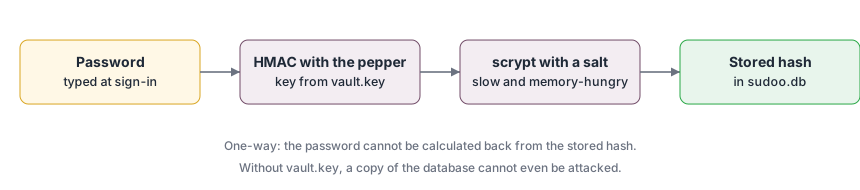
| Measure | What it is | What it stops |
|---|---|---|
| Salt | 16 random bytes, different for every password, stored next to the hash. | Two people with the same password get different hashes; precomputed lists are useless. |
| Pepper | A secret mixed into every password, derived from vault.key, which is not stored with the hashes. | Someone with only the accounts file cannot test a single guess. |
| Slowness (scrypt) | Each check takes about 0.1 s and 32 MB of memory. | A user waits 0.1 s once. An attacker trying millions of guesses waits for weeks per password, and cannot use cheap parallel hardware because of the memory. |
What the database (sudoo.db) holds for an account (shortened):
"admin": {
  "role": "admin",
  "hash": "scrypt-peppered$32768$8$1$9f1c...e2$4b7a...0d",
  "session_version": 3
}
The parts after scrypt-peppered are the settings (N, r, p), the salt and the result. The password itself is not there in any form.
3. Example: what a stolen accounts file reveals
Suppose a copy of the database leaks, for example from a careless backup.
| Stored as | What the attacker can do |
|---|---|
| Plain text | Read every password at once and try them on other sites. |
| Fast hash without salt (for example MD5) | Look most of them up in public tables within minutes. |
| Salted scrypt | Guess each password separately, about ten per second per computer. Weak passwords still fall eventually. |
| Salted, peppered scrypt (the panel) | Nothing, without vault.key as well. With it, still ten guesses per second per computer, against 24-character random generated passwords: longer than the age of the universe. |
4. Encrypting secrets: AES-256-GCM
A deploy key must be used, so it is encrypted with AES-256-GCM:
| Part | Meaning |
|---|---|
| AES | The world's standard encryption algorithm, used by banks and governments. |
| 256 | The key length: 2^256 possible keys, far beyond any possible guessing. |
| GCM | A mode that also adds a seal (an authentication tag). If one bit of the stored value is changed, decryption refuses instead of producing garbage. |
| Nonce | 12 random bytes per encryption, so encrypting the same value twice gives different results. |
| Label (associated data) | Each value is sealed together with what it is, such as deploy-key:acme-co/sales. Copied to another place, it no longer opens. |
A stored value looks like enc:v1:mJ2s0V... (version, then nonce, ciphertext and seal in base64).
The key is vault.key: 32 random bytes, created on the server the first time it is needed, readable by root only. Keeping it apart from the data is what makes the encryption useful: a backup of the deploy keys alone is unreadable. That is also why it must be backed up separately, and why losing it means recreating deploy keys.
When git needs a deploy key, the key is decrypted into a file in memory (/dev/shm), readable only by root, used for that one connection, and deleted.
5. Where each secret lives
| Secret | Protection | File |
|---|---|---|
| Panel account password | salted, peppered scrypt hash | manager/sudoo.db |
| Deploy key (private part) | AES-256-GCM encrypted | manager/keys/deploy/<owner>__<repo>.key |
| Odoo master password | pbkdf2-sha512 hash for Odoo; AES-256-GCM encrypted copy for administrators | instances/<name>/config/odoo.conf; instances/<name>/.env |
| Session-signing key | random, root only | manager/secret_key |
| Vault key | random, root only; back up separately | manager/vault.key |
| Instance database password | root only; reachable only on the instance's private Docker network | instances/<name>/.env, config/odoo.conf |
Odoo login of instances (admin / admin) | none on purpose: instances are for showing |
6. Good passwords
Length matters far more than odd characters. A short sentence is easy to remember and very hard to guess:
| Password | Why |
|---|---|
Odoo2024! | Refused: too short, and contains a common word. |
P@ssw0rd123456 | Refused: a common password with letters swapped for symbols; attackers try these first. |
green tea at 7 on the balcony | Good: 29 characters, easy to remember. |
Xq7-mB2r-Lp9w-Tc4z | Good: random; keep it in a password manager. |
The panel refuses passwords shorter than 12 characters, with fewer than 6 different characters, containing the user name or a common word.
7. Try it yourself
import hashlib, os, time

salt = os.urandom(16)
start = time.time()
digest = hashlib.scrypt(b"green tea at 7 on the balcony", salt=salt, n=2**15, r=8, p=1, maxmem=64 * 2**20)
print(digest.hex(), f"{time.time() - start:.2f} s")      # about 0.1 s: fine once, very slow millions of times

print(hashlib.md5(b"password").hexdigest())               # 5f4dcc3b5aa765d61d8327deb882cf99
Search the internet for that MD5 value: it is found immediately, which is why fast, unsalted hashes are not used.