

Docker and Containers
In one sentence: Docker runs each program in its own sealed box (a container), so many Odoo versions, each with its own database, can run side by side on one server without disturbing each other.
Contents
- An everyday comparison
- The four words to know
- Docker Compose: one instance, one file
- What it looks like on our server
- What we gain
- Try it yourself
1. An everyday comparison
Think of shipping containers. Whatever is inside (bananas, cars, furniture), every container has the same shape, so every ship and crane handles it the same way. Containers on one ship do not mix their contents, and one can be taken off without opening the others.
A Docker container is the same idea for programs: Odoo 18 with its Python libraries in one box, Odoo 20 with different libraries in another, PostgreSQL in a third. The server only has to know how to run boxes.
2. The four words to know
| Word | Meaning | Example on our server |
|---|---|---|
| Image | A ready-made, read-only package of a program and everything it needs. Like a recipe, or a template. | odoo:20.0, published by Odoo; postgres:16 |
| Container | A running copy of an image, with its own files, processes and network. Like a dish made from the recipe. | odoo-sales-main-odoo-1 |
| Volume | A storage area that survives when a container is removed and created again. | odoo-sales-main_db-data holds the instance's database |
| Port | A numbered door on which a program listens. | The instance's Odoo listens on 127.0.0.1:28070 |
The key idea: containers are disposable, volumes are not. Restarting or recreating an instance's containers never loses its data, because the data lives in volumes. Deleting an instance removes both.
3. Docker Compose: one instance, one file
Docker Compose describes several containers that belong together in one file. Every instance has its own docker-compose.yml, written by the panel (shortened here; the real file repeats the hardening for both services and writes every value literally):
name: odoo-sales-main

services:
  db:                                   # PostgreSQL, the instance's database
    image: postgres:16@sha256:...       # pinned by digest when the instance was created
    read_only: true                     # system files cannot be changed
    security_opt: [no-new-privileges:true]
    cap_drop: [ALL]                     # every Linux capability dropped...
    cap_add: [CHOWN, DAC_OVERRIDE, FOWNER, SETGID, SETUID, KILL]   # ...but what the image's start needs
    tmpfs: [/var/run/postgresql, /tmp]  # in-memory folders it may write
    networks: [backend]                 # internal network only: no port, no way out
    volumes:
      - db-data:/var/lib/postgresql/data

  odoo:                                 # Odoo itself, the official image
    image: odoo:18.0@sha256:...
    read_only: true
    security_opt: [no-new-privileges:true]
    cap_drop: [ALL]                     # Odoo runs as the user "odoo" and needs none
    mem_limit: 2g                       # limits from the panel's settings
    pids_limit: 1024
    ports:
      - "127.0.0.1:28069:8069"          # reachable from the server only
    networks: [backend, default]
    volumes:
      - odoo-data:/var/lib/odoo         # attachments
      - /opt/odoo/instances/sales-main/config:/etc/odoo:ro            # odoo.conf, read-only
      - /opt/odoo/instances/sales-main/addons:/mnt/extra-addons:ro    # the GitHub repository, read-only

networks:
  backend: {internal: true}

volumes:
  db-data:
  odoo-data:
The panel checks the containers against this file every 20 seconds and undoes changes made by hand; see Security.
With this file, one command does a whole job:
| Command (the panel runs these) | Effect |
|---|---|
docker compose up -d | Start the instance (database first, then Odoo) |
docker compose stop | Pause it: containers stop, data stays |
docker compose restart odoo | Restart Odoo |
docker compose down -v | Delete it completely, volumes included |
4. What it looks like on our server
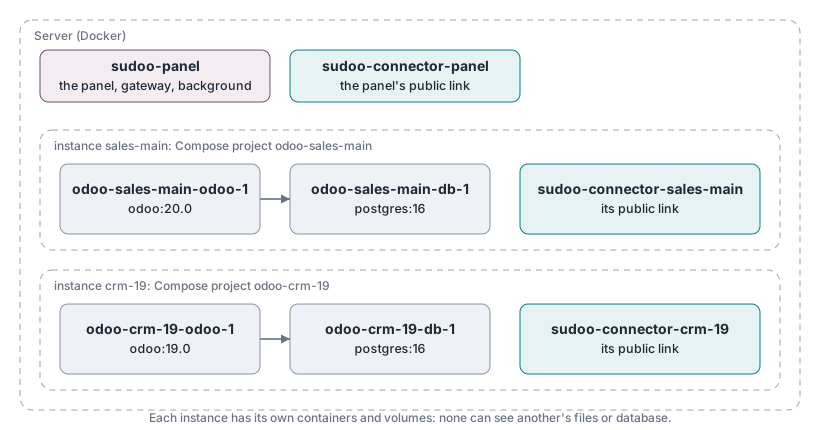
Both instances use different Odoo versions with different Python libraries, at the same time, and neither can see the other's files or database.
The panel itself controls Docker through the server's Docker socket (/var/run/docker.sock). That is what lets a button in a web page create containers, and also why an administrator account in the panel is as powerful as root on the server.
5. What we gain
| Gain | Without Docker |
|---|---|
| Odoo 18, 19 and 20 side by side | Each version needs different Python libraries; they would conflict on one system. |
| An instance can break without affecting others | One shared installation: one bad module could stop every instance. |
| Deleting an instance leaves nothing behind | Leftover databases, files and settings scattered over the server. |
| Exactly Odoo's official behaviour | Our own installation steps, which could differ from Odoo's. |
| A paused instance uses no memory | Stopping and starting services by hand. |
6. Try it yourself
On a computer with Docker:
docker run --rm hello-world                       # downloads a tiny image and runs it once
docker run -d --name test-odoo-db -e POSTGRES_USER=odoo -e POSTGRES_PASSWORD=odoo -e POSTGRES_DB=postgres postgres:16
docker run -d --name test-odoo --link test-odoo-db:db -p 127.0.0.1:8069:8069 odoo:19.0
Open http://localhost:8069: an Odoo 19, with no installation on your computer. Remove everything:
docker rm -f test-odoo test-odoo-db